
In order to make it easier for you to find the right settings, here is a quick overview on the top questions we receive regarding customizing the first layer:
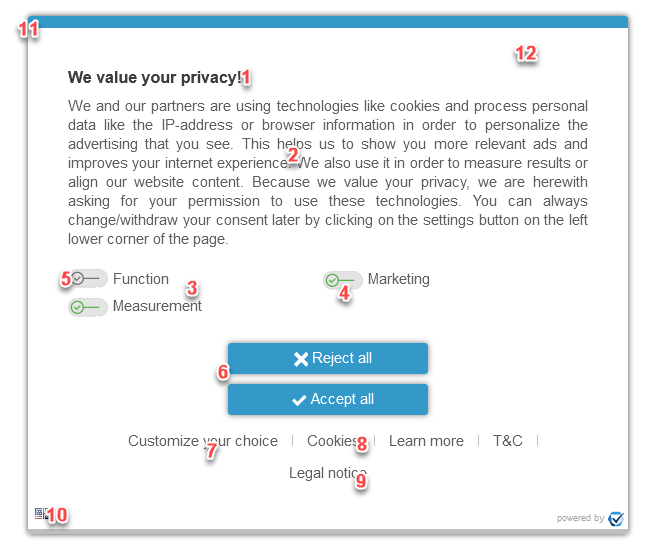
- How can I change the headline?
Headline Style: Menu > Designs > Edit > Box “Welcome page” > Headline
Headline content: Menu > Texts > Choose your design and language > Headline - How can I change the text?
Text Style: Menu > Designs > Edit > Box “Welcome page” > Text
Text content: Menu > Texts > Choose your design and language > Text - How can I change the purposes?
Using purposes: Menu > Purposes > Activate/deactivate the required purposes
Changing the names: Menu > Texts > Choose your design and language > Box “Custom Purposes” > Purpose X Name
Order of purposes: Purposes are ordered by ID. Menu > Purposes > Edit > Purpose-ID
Removing purposes from the welcome page: Menu > CMPs > Edit > Box “CMP Appearance” > Show advanced options > Purposes on first screen - How can I change the toggle image?
Change the image: Menu > Designs > Edit > Box “Toggles”
Display a list instead of toggles: Menu > Designs > Edit > Box “Welcome page” > Show advanced options > Purposes - How can I change the default state of a toggle?
Setting a purpose to “always on”: Menu > Purposes > Set legal basis to “Legitimate Interests (no opt-out possible) (GDPR 6.1.f)”
Setting a purpose to “active by default”: Menu > Purposes > Set legal basis to “Legitimate Interests (GDPR 6.1.f)” - How can I change the buttons?
Button Style: Menu > Designs > Edit > Box “Buttons” - How can I change the custom settings link?
Style: Menu > Designs > Edit > Box “Welcome page” > Links
Text: Menu > Texts > Choose your design and language > Box “Links” - How can I (not) display the cookie list?
Enable/disable the list: Menu > Designs > Edit > Box “Welcome page” > Links > Show/Hide Cookies - How can I (not) display the T&C and/or Legal notice link?
Enable/disable the links: Links are automatically enabled/disabled if URLs are set up. Menu > CMPs > Edit > Box “CMP Appearance” > Legal notice URL / T&C URL - How can I change the languages?
Possible languages: Menu > CMPs > Edit > Box “CMP Appearance” > Languages
Default language: Menu > CMPs > Edit > Box “CMP Appearance” > Languages > Setting in the right lower corner
Disable the language choice: Set possible languages to only 1 language.
Set language per page and not per users browser: Use client side configuration optioncmp_setlang - How can I change the box?
Box Style: Menu > Designs > Edit > Box “Box settings” - How can I change/add my logo?
via CMP settings for all designs: Menu > CMPs > Edit > Box “CMP Appearance” > Logo
via Design settings for this design only: Menu > Designs > Edit > Box “Box settings” > Show advanced options > Logo - How can I hide/block the website while the consent layer is shown?
Design settings: Menu > Designs > Edit > Box “Box settings” > Set “Hide website” to Yes