Every plan includes a set number of pageviews per month. What happens when you go over depends on your plan:
- Free plan: your account has a hard cap. Once you reach it, we pause your CMP until the next month begins.
- Starter, Essential and Enterprise: there’s no cap. Your CMP keeps running, and we bill pageviews above your included volume on your invoice at your plan’s rate.
How do I know if my account has a cap?
If your account has a cap, you’ll see a usage bar when you’re logged in:
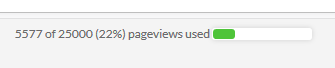
The color shows how your usage compares with your monthly cap. Green means you’re within your cap. Yellow or red means you’re using pageviews faster than your plan allows, and you’ll likely reach your cap before the end of the month.
If you don’t see a usage bar, your account has no cap.
What happens when my account reaches its cap?
Once you reach your monthly cap, we stop delivering all CMPs in your account. The consent layer no longer shows, so visitors can’t accept or reject data processing on your website.
What are the legal implications?
If the consent layer doesn’t show, visitors can’t give consent (under the GDPR) or opt out (under the CCPA). Third-party codes on your website stay blocked by default, so no data processing that needs consent takes place. There may still be implications for visitors’ rights, such as the right to information and transparency. If your current plan doesn’t cover your traffic, we recommend upgrading.
What else does this affect?
If the consent layer doesn’t show, we treat all visitors as opted out and block the third-party codes on your website. Until your CMP is back, this means:
- No reports in Google Analytics
- No Meta (Facebook) remarketing
- No social sharing buttons or other third-party codes
- No consent signal through the IAB TCF v2.4, so your advertisers may show lower-paying, non-personalized ads
When will my CMP start again?
Your CMP starts again automatically at the beginning of the next month, with the same cap.
How can I get more pageviews?
Upgrade to a higher plan. You’ll find the upgrade link in the top-right corner of your account. When you change plans, the new plan’s pageview rules apply.