Starting October 31, 2025, Microsoft will enforce stricter consent signal requirements through its analytics tool, Clarity, for page visits coming from the European Economic Area (EEA), the United Kingdom (UK), and Switzerland. As part of this change, Clarity will fully support Google Consent Mode (GCM). Website operators must implement either Google Consent Mode or Clarity Consent Mode in order to remain compliant and ensure uninterrupted access to analytics insights from Clarity.
This article will discuss the key dates for the enforcement of consent signals and explain what website operators need to do. Let’s start!
What is Google Consent Mode (GCM)?
Google Consent Mode is a Google tool that helps your website adapt to each visitor’s consent choices without losing valuable insights. Instead of simply blocking analytics or ads, it allows Google to collect and model data in a more privacy-friendly way. With machine learning–powered conversion modeling, you can still understand how users interact with your site and track key conversions, even if some visitors don’t give consent.
Timeline for the enforcement of Consent Mode
- Mid-September 2025: Integrated support for Google Consent Mode becomes available in Clarity.
- October 31, 2025: Enforcement begins, websites must send valid consent signals via Clarity Consent Mode, Google Consent Mode or any other supported method).
What website owners can do now
If you already use Google Consent Mode
No further action is required. Once Microsoft enables support for GCM, Clarity will automatically recognize the consent signals.
If you are not using Google Consent Mode
Enable Google Consent Mode in your Consent Management Platform (CMP) if you rely on consent signals such as ad_storage and analytics_storage for advertising and analytics purposes.
Alternatively, you can also use another supported consent signal solution (e.g., Clarity’s Consent Mode).
You can follow our setup guides here:
Working with Google Consent Mode: https://help.consentmanager.net/books/cmp/page/working-with-google-consent-mode
Working with Clarity Consent Mode: https://help.consentmanager.net/books/cmp/page/working-with-microsoft-clarity-consent-mode
Why this matters
Without valid consent signals, Clarity tracking and reporting may be disrupted after October 31. Implementing Consent Mode ensures:
- Compliance with legal and platform requirements
- Reliable analytics and reporting
- Continued use of Clarity features
To verify your setup for Google Consent Mode
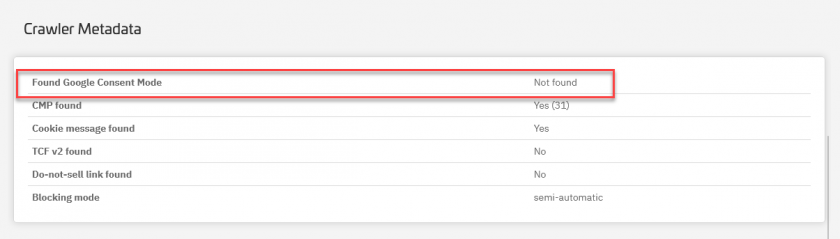
In your consentmanager dashboard, navigate to Menu > Compliance > Cookie Crawler in your CMP and start a manual crawl. Once complete, review the Consent Mode details at the bottom of the results. You should be able to see whether Google Consent Mode signals were found.
Conclusion
Prepare your website before the October 31 deadline by activating a valid consent signal solution. Doing so will enable you to continue using Microsoft Clarity while retaining valuable analytics insights. If you are already using Google Consent Mode, Clarity will automatically detect it once support is launched. Alternatively, you can implement Clarity Consent Mode or any other supported method to ensure uninterrupted analytics tracking.